


The talk was going to be about the WebAssembly System Interface (WASI). I knew what I wanted to talk about but I wanted a couple demos that were more real-world than the typical 'hello world' style. I had an idea for the applications I wanted to write but, to write them, I needed to compile some C libraries. Unfortunately, I was having some difficulties getting things set up on Windows.
My first thought for a workaround was to set up a Linux virtual machine but I was curious if there was another way. One thought that crossed my mind was, can Docker help here?
Docker

After watching the video, I started looking though the images on Docker Hub and discovered that there's a Docker image for the Emscripten SDK. This is useful to me for a couple of reasons:
- I prefer to have Emscripten use the versions of the tools it installed rather than a different version on my machine just in case the changes impact things when compiling a module. Being in a container, all the tools Emscripten needs are in the container with it allowing me to adjust the tools on my machine as needed.
- I often switch between versions of Emscripten to test different things. Having an image for each version I need makes things a lot easier. Sometimes I've had to uninstall a version of Emscripten before being able to install the next one. Now, I just need to pull and run the image with the version I need.
In the end, I created a Docker image derived from an Emscripten image and was able to build the demos I wanted for my ConFoo talk.
A few days before the ConFoo conference started, I was talking with the Uno Platform team about Docker. I thought Docker might be useful for C# developers for one-click deployment because I saw on Docker Hub that there was an image with IIS (Internet Information Services).
An article about Docker
After the conference was over, I started looking into Docker from a C# perspective. Unfortunately, every time I tried to build a Windows Docker image, I'd get errors. I spent a number of evenings reading about Windows containers and trying different things but kept spinning my wheels.
I learned a lot about Windows containers in the process but I felt a little dumb when I ran across an article that explained my problem. It turns out that you can't create Linux and Windows containers at the same time. You need to switch Docker Desktop to use one or the other and I was trying to create a Windows container while configured for Linux.
Today, I'm pleased to announce that my latest article "Deploying C# Web Applications with Docker" has been published on the Uno Platform's blog. The article walks you through building an image with IIS and .NET Core, publishing it to a private registry, pulling the image, and running the container.


 The book introduces the WebAssembly stack and walks you through the process of writing and running browser-based applications. It also covers dynamic linking multiple modules at runtime, using web workers to prefetch a module, threading, using WebAssembly modules in Node.js, working with the WebAssembly text format, debugging, and more.
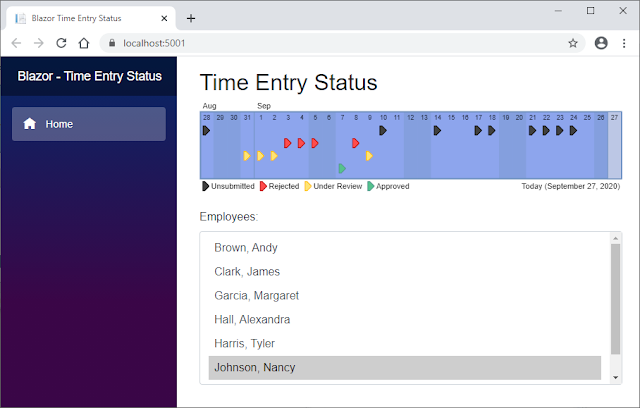 As I was digging into WebAssembly from a C# perspective for an article that I was preparing to write, I decided to use some research time that my company gave me to dig into Blazor WebAssembly by rewriting a small Java application that I built in 2011.
 My book shows you how to use WebAssembly threads but, at the time of its writing, they were only available in Firefox behind a flag. They're no longer behind a flag but Firefox has added a requirement: To enable the SharedArrayBuffer, you need to include two response headers.
 Over the 2019 Christmas break, I helped a developer find a way to import an Emscripten-generated WebAssembly module into Vue.js. This article details the solutions found.